
Blue Lantern Security received this email in connection with publishing our Chrome Monitor extension. The message posed as Google, giving it a plausible connection to work we were already doing.
SPF passed. DKIM passed. The content panel showed no phishing keywords, grammar issues or active scripts. There were no attachments. Yet Blue Lantern Security marked the email Suspicious.
Our assessment was that this was likely a sophisticated phishing attempt. The timely publishing context made the approach convincing, while the recently registered sender domain raised a question the clean content checks could not answer: why was a message posing as Google coming from such a new domain?
The domain age strengthened our concern alongside the claimed identity, reply-address mismatch and DMARC failure. A new domain alone does not establish phishing; the significance comes from how those findings fit the message. Here is how we read the report.
Start with the findings that need your attention
This Blue Lantern Security Email Analyzer report was generated on September 9, 2026. Its results fall into three groups:
| Area | What the report found | Where to focus |
|---|---|---|
| Sender and authentication | Different From and Reply-To addresses; SPF and DKIM passed; DMARC failed | Whether the reply destination is expected and why DMARC failed |
| Domains and links | Nine URLs; a domain reported as 83 days old; a top-level-domain warning | Whether the destinations fit the sender and the message's request |
| Content and attachments | No keyword, grammar or active-script findings; no attachments | The request itself—especially anything involving money, passwords or sensitive information |
The publishing context matters: a message about an extension we were releasing had an immediate reason to attract our attention. We still needed to check whether its sender and destinations supported its claimed connection to Google.
1. Check where your reply would go
The From address tells you who the message claims to come from. Reply-To tells your mail app where to send a reply. In this example, those addresses differ, so the report flags a mismatch.
Look at both addresses before replying. Does the reply address belong to the organization you expected? Is it an unfamiliar domain? A separate support address may be normal for a business, but an unexpected destination deserves verification.
The report also shows that the sender and recipient domains differ. This is an informational check: an email from an outside company will normally have different domains. Failing this check does not contribute to the report's failed-check count.
Your next step: If you cannot explain the reply destination, contact the organization through a number or website you already trust. Do not use the questionable reply address to verify itself.
2. Understand why passing SPF and DKIM does not settle DMARC

These checks answer related but different questions:
- SPF: Is the sending server authorized for the domain being checked?
- DKIM: Does the message have a valid signature from a signing domain?
- DMARC: Does a passing SPF or DKIM result align with the domain in the visible From address?
That last relationship matters. SPF and DKIM can pass for domains that do not meet DMARC's alignment requirements. This is one possible explanation for the combination shown here; the original headers would be needed to establish the cause for this message. Microsoft explains how email authentication works.
Your next step: Review the authentication details or ask your mail administrator to check them. For an unexpected request, verify the sender independently before acting. Authentication helps assess a message's origin; it cannot tell you whether a requested payment is authorized.
3. Follow the domain warnings to the relevant links
The report found nine URLs. Its link findings call attention to a recently registered domain and a top-level-domain risk indicator.
Use those findings to narrow your review. Which destination would receive your login, payment or download request? Does that destination fit the organization you expected? A broad domain warning is a reason to examine the specific link, not a conclusion about every site using that domain ending.
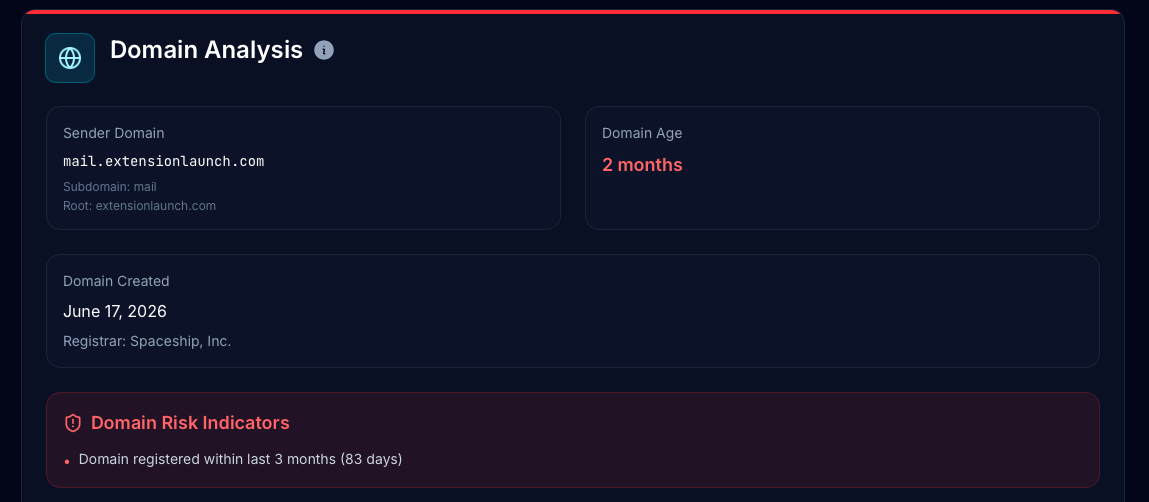
Blue Lantern Security uses two thresholds for domain age:
- Younger than one month: the domain-age check fails.
- Three months old or newer: the report flags the domain as recently registered, including domains old enough to pass the check.
This domain was 83 days old when analyzed. It therefore passes the age check while still receiving the three-month flag. The flag draws attention to recent registration; it does not add a domain-age failure to this report.
The timing makes this finding more significant. The domain was created on June 17, 2026, and the routing panel shows July 6 timestamps—about 19 days later. Its reported age of 83 days reflects the September analysis, but it was only a few weeks old at the time shown in the message's routing history.
For a message posing as Google during our extension publishing process, that very recent registration strengthened our suspicion. It does not identify who controlled the domain or prove malicious intent, but it gave us a concrete reason to question the claimed affiliation.
Your next step: Investigate the relevant destination without opening it in your normal browser. Our suspicious-link checking guide explains the workflow. Check a scanner's privacy settings before submitting a personalized link.
4. Read a clean section for what it actually checked
The content panel reports zero phishing keywords, zero grammar issues and no active scripts. That helps narrow the investigation: the reported concerns are elsewhere. Now read the message's request. A well-written email can still ask you to change bank details or disclose a password.

The attachment-type check also passes. In this case, the detail panel explains why that should not be read as a malware clearance: there are no attachments.
For a message that does contain files, Email Analyzer checks for attachment types associated with executable content or macros. Deeper static malware analysis is a separate tool. The product documentation explains how to request it.
What would you do with this email?
We assessed this message as likely phishing because its claimed Google identity and timely extension-publishing context sat alongside a very young domain and authentication concerns. Passing SPF and DKIM did not resolve that mismatch.
For a message like this, pause any requested action and verify the publishing status through the Chrome Web Store developer dashboard or an established Google support channel. Open that service independently rather than following the email's links.
A useful case note would say:
Likely phishing: the email posed as Google in connection with publishing Blue Lantern Security's Chrome Monitor extension. The sender domain was only about 19 days old at the time shown in the routing history. The report also shows a reply-address mismatch and DMARC failure. Verify the claimed publishing issue directly through Google before acting.
This is our assessment of the message, informed by the publishing context and report findings. The report does not establish a malicious payload or confirm the attacker's identity. The practical lesson is to check whether the technical evidence fits the organization the message claims to represent.
Try the same review on your own message
Start with Is This Email a Scam? for the .eml upload steps, access requirements and privacy information. Once your report is ready, review the sender, authentication and relevant destinations, then decide what still needs verification.
For other investigation workflows, compare the best tools to analyze a suspicious email.